
In partnership with

Welcome Automaters!
LinkedIn is on fire again.
And no, it’s not about cringe posts or fake promotions—this time, it’s reach just… disappearing.
Imagine logging in, posting the same quality content as always… and your reach just falls off a cliff. Meanwhile, male coworkers with smaller followings suddenly get crazy engagement.
Probably not a coincidence right? .
Well here’s what we found:
A product strategist decided to test a theory. She switched her LinkedIn profile from female to male, with the same account and the same content.
And the outcome?
Not subtle. Her impressions suddenly went up 200%. Engagement up 27%
Another woman tried it too. Her impressions went up 238%.
At that point, it stopped feeling like a fluke.
Now, LinkedIn claims its algorithm and AI systems don’t use demographic data like gender, age, or race to decide what gets visibility.
And technically… that can still be true.
But here’s the thing: LinkedIn’s feed is now powered by LLMs that rank content based on what they think is: clear, valuable, “professional” and worth showing
And the worst part? Those models are trained on the internet. Which, as we all know, is already biased.
So what’s the theory?
Experts think the algorithm may be favoring writing styles historically associated with men.
Think: Short, direct, confident, no softeners, less emotion, more “here’s the insight” energy
So it’s not just who you are. It’s how the AI thinks a professional is supposed to sound.
The Big picture?
Even when platforms swear they’re neutral, AI can still quietly reinforce old power dynamics at scale.
And when visibility equals opportunity?
That’s not just a tech issue. That’s a career issue.
So if your reach has been acting strange lately… yeah. You’re not imagining it.
Here's what we have for you today
🦾 How to Create Your Own ChatGPT Wrapped 2025
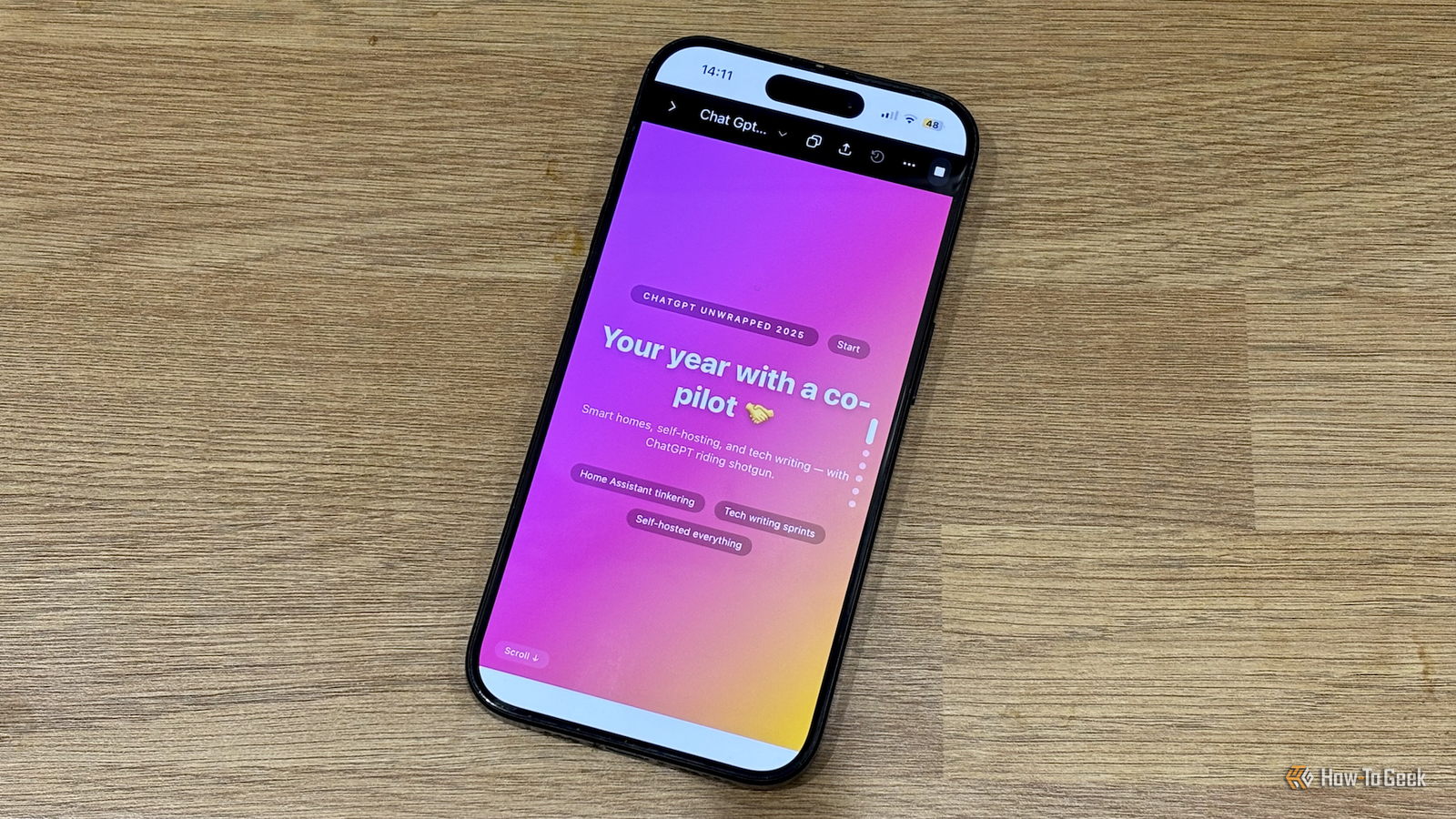
ChatGPT users, ever wondered how you’ve actually used ChatGPT this year? Or maybe more interesting… what ChatGPT thinks about you based on your usage?
Because it turns out, you can generate your own ChatGPT Wrapped 2025 in a surprisingly simple way.
Why bring this up?
Back in 2016, Spotify Wrapped broke the internet, and overnight, everyone needed to know their stats, their habits, their personality—all wrapped up in colorful slides.
Since then, almost every app has copied the idea.
Almost.
Because somehow, ChatGPT still doesn’t have a Wrapped.
So, of course, the internet fixed that.
A clever idea making the rounds on LinkedIn shows how you can generate your own ChatGPT Wrapped 2025 in a much easier way than you’d expect. Like No plugins. No exports. Just a smart prompt and one underused feature.
Here’s the genius trick.
ChatGPT already knows a lot about how you use it.
If you’re a regular user, it has memory, conversation history, and context across your chats. That means it can infer patterns: what you ask for most, what you’re good at, how you think, and what you keep coming back to.
So instead of asking ChatGPT for raw analytics (which it doesn’t actually have), the prompt asks it to do something smarter:
Summarize you.
Your habits. Your strengths. Your power-user tendencies. Even predictions for how you’ll use AI next year.
But the really clever part isn’t the summary.
It’s the presentation.
Stats alone are boring. Spotify Wrapped works because it feels real—bold colors, swipeable slides, and big visual moments.
That’s where ChatGPT’s Canvas feature comes in.
Canvas lets ChatGPT write and preview code in a separate window. So the prompt doesn’t just ask for insights. It asks ChatGPT to build a Spotify-Wrapped-style dashboard.
Think:
Vertical slides
One idea per screen
Bright gradients
Simple infographics
Smooth, story-style scrolling
The result? A fully scrollable, Wrapped-style experience that looks shockingly legit—except it’s personalized to how you use ChatGPT.
Now, quick heads-up: the stats aren’t exact.
ChatGPT doesn’t actually see your message counts or total hours, so think of the numbers as very educated guesses.
But here’s the surprising part — the insights are often dead on.
The order of how you use it. The themes you keep coming back to. The way it describes how you think and work.
It feels accurate because it’s based on patterns, not raw logs.
And that’s the bigger takeaway.
This isn’t just a fun Wrapped-style experiment. It’s a sneak peek at how powerful inference already is—and how, with the right prompt, you can spin up features that don’t officially exist (yet).
If you want the prompt to build your own ChatGPT Wrapped 2025, check out the full step-by-step guide here, and of course give it a try when you’ve got a few minutes.
Fair warning: you might sit there like, “okay… that’s a little too accurate.” 😄
Turn AI Into Extra Income

You don’t need to be a coder to make AI work for you. Subscribe to Mindstream and get 200+ proven ideas showing how real people are using ChatGPT, Midjourney, and other tools to earn on the side.
From small wins to full-on ventures, this guide helps you turn AI skills into real results, without the overwhelm.
🧱 Around The AI Block
🤔 The end of OpenAI, and other 2026 predictions.
🗣️ Parents call for New York governor to sign landmark AI safety bill.
🤦 Grok spreads misinformation about the Bondi Beach shooting.
🏭 AI data center boom could be bad news for other infrastructure projects.
🎧 Google Translate brings real-time speech translations to any headphones.
🦾 OpenAI has released the ‘circuit-sparsity’: A set of Open tools for connecting Weight Sparse Models and Dense Baselines through Activation Bridges.
🛠️ Trending Tools
PitchFit provides comprehensive startup analysis through AI-powered market research, financial modeling, pitch training, and investor matching — helping entrepreneurs validate, practice, and fund their business ideas. x
SimGym is a first-party Shopify app that creates AI shoppers who browse your store like real customers, interact with products, navigate collections, add items to cart, and give qualitative feedback on their experience. x
AdMakeAI researches your competitors’ Facebook ads, saves the best ones, and uses AI to generate similar ads for your brand, giving your marketing a major shortcut.
HitPaw AI is a comprehensive suite of AI-powered multimedia tools for editing, generating, enhancing, and converting videos, photos, and audio. Notably, it can improve & upscale videos to 4K/8K on PC/Mac — all with simplicity and efficiency.
GPT-5.2 is OpenAI’s latest model built for long, complicated tasks. It delivers fewer hallucinations and improved multi-step reasoning, making it ideal for professional knowledge work.x
🤖 AI Workout Of The Day: How to Use AI for Market Research and Strategy Summaries
“Deep Research” sounds impressive, especially since the feature has become standard in AI — but how effectively can each AI actually distill insights you can use?
We tested ChatGPT, Gemini, and DeepSeek to see which one can skim complex research sources, extract key takeaways, and give you context you can actually use in strategy docs, reports, pitches, or projects.
The goal isn’t reading every word — it’s about smart, practical summaries that feel almost like having a research assistant who already gets your priorities.
How to Use This Prompt Effectively
Be Specific About Research Type: Indicate whether it’s market trends, competitor analysis, tech adoption, or another focus.
Provide Context: Include the research text or report excerpts the AI should analyze, or instruct it to find relevant sources online if you don’t have any.
Set the Goal: Specify the desired output: a summary, key insights, recommendations, or context for another project.
Encourage Clarity & Actionability: Ask the AI to highlight what matters most and avoid irrelevant details.
Encourage Contextualization: Make sure the AI links research findings to practical applications and provides sources or references for its output.
Compare Across Models: Evaluate which AI produces the clearest, most insightful, and structured summary for practical use. Simulate how you’d skim a report, then see how the AI synthesizes it into concise, strategic output.
PS: The live side-by-side comparison of ChatGPT vs Gemini vs DeepSeek is exclusive to premium subscribers. Now’s the moment to upgrade if you want to see the showdown in action.
⚡ Prompts to try:
Conduct deep research on the current trends in [insert industry/topic, e.g., AI-powered marketing tools]. Provide a summary that includes:

1. Key market trends and emerging technologies
2. Notable companies and their strategies
3. Potential opportunities and challenges
4. Actionable insights for strategy documents or reports

Organize your response clearly with headings or bullet points. Assume I’ll use this research to inform strategy documents, so prioritize relevance and clarity over raw data volume. Make it concise but comprehensive, as if I had skimmed a full research report and now want AI to give me the most important takeaways — and show your sources.
P.S. Each Workout of the Day (WoD) is powered by original prompts written by our team — no recycled or external templates here. That means lower risk of prompt injection or manipulation, and higher trust in what you’re creating.
Also…
Upgrade now to see this whole month’s prompt videos and more, or buy TODAY’S WOD for just $1.99
Is this your AI Workout of the Week (WoW)? Cast your vote!
That's all we've got for you today.
Did you like today's content? We'd love to hear from you! Please share your thoughts on our content below👇
What'd you think of today's email?
Your feedback means a lot to us and helps improve the quality of our newsletter.

🚀 Want your daily AI workout?
Premium members get daily video prompts, premium newsletter, an no-ad experience - and more!
🔓 Unlock Full AccessPremium members get::
- 👨🏻🏫 A 30% discount on the AI Education Library (a $600 value - and counting!)
- 📽️ Get the daily AI WoD (a $29.99 value!)
- ✅ Priority help with AI Troubleshooter
- ✅ Thursday premium newsletter
- ✅ No ad experience
- ✅ and more....
